
This is the second part of TensorFlow Lite section. The last article has covered the topics of converting the Keras model to TensorFlow Lite model and using it. In this article we are really removing TensorFlows dependency and excluding it completely.
TensorFlow Lite – Part 2/2
Removing TensorFlow dependency
When we only want to use TensorFlow Lite we have a problem, because we used two functions (load_img, preprocess_input) that live in Keras. Keras is not available in TensorFlow Lite, which means we need to get both functions from somewhere.
# Reading the image
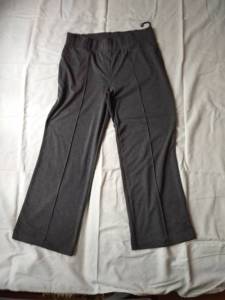
img = load_img('pants.jpg', target_size=(299,299))

# Preprocessing the image
x = np.array(img)

# Turning this image into a batch of one image
X = np.array([x])
X = preprocess_input(X)
Let’s see how we can get rid of this code.
from PIL import Image

with Image.open('pants.jpg') as img:
    img = img.resize((299, 299), Image.NEAREST)

img
def preprocess_input(x):
    x /= 127.5
    x -= 1.
    return x
# Preprocessing the image --> we need to set dtype here
x = np.array(img, dtype='float32')

# Turning this image into a batch of one image
X = np.array([x])
X = preprocess_input(X)

# Initializing the input of the interpreter with this X
interpreter.set_tensor(input_index, X)

# Invoking the computations in the neural network
interpreter.invoke()

# Results are in the output_index, so fetching the results...
preds = interpreter.get_tensor(output_index)
preds

classes = [
    'dress',
    'hat',
    'longsleeve',
    'outwear',
    'pants',
    'shirt',
    'shoes',
    'shorts',
    'skirt',
    't-shirt'
]

# Combining labels with actual prediction
dict(zip(classes, preds[0]))

# Output:
# {'dress': -1.8251266,
#  'hat': -5.563747,
#  'longsleeve': -1.7097405,
#  'outwear': -1.1727808,
#  'pants': 8.934737,
#  'shirt': -2.17537,
#  'shoes': -2.958527,
#  'shorts': 2.3701177,
#  'skirt': -1.7067664,
#  't-shirt': -4.3549995}
Simpler way of doing it
We can use a library called Keras image helper (you can find it in Alexeys repository when you look for “keras-image-helper”). This library can do this not only for Xception models but also for other models.
!pip install keras-image-helper
from keras_image_helper import create_preprocessor
First we need to create an preprocessor with its two arguments. First parameter is “xception”, which is the type of architecture/model we want to use. Second parameter is the “target_size” which is the size we want to resize the images. The preprocessor has multiple functions:
- from_path –> for loading an image which is saved locally
- from_url –> for downloading an image from url
preprocessor = create_preprocessor('xception', target_size=(299,299))

url = 'http://bit.ly/mlbookcamp-pants'
X = preprocessor.from_url(url)

interpreter.set_tensor(input_index, X)
interpreter.invoke()
preds = interpreter.get_tensor(output_index)

classes = [
    'dress',
    'hat',
    'longsleeve',
    'outwear',
    'pants',
    'shirt',
    'shoes',
    'shorts',
    'skirt',
    't-shirt'
]

# Combining labels with actual prediction
dict(zip(classes, preds[0]))

# Output:
# {'dress': -1.8251266,
#  'hat': -5.563747,
#  'longsleeve': -1.7097405,
#  'outwear': -1.1727808,
#  'pants': 8.934737,
#  'shirt': -2.17537,
#  'shoes': -2.958527,
#  'shorts': 2.3701177,
#  'skirt': -1.7067664,
#  't-shirt': -4.3549995}
Putting everything together
import tensorflow.lite as tflite
from keras_image_helper import create_preprocessor

interpreter = tflite.Interpreter(model_path='clothing-model.tflite')
interpreter.allocate_tensors()

input_index = interpreter.get_input_details()[0]['index']
output_index = interpreter.get_output_details()[0]['index']

preprocessor = create_preprocessor('xception', target_size=(299, 299))

url = 'http://bit.ly/mlbookcamp-pants'
X = preprocessor.from_url(url)

interpreter.set_tensor(input_index, X)
interpreter.invoke()
preds = interpreter.get_tensor(output_index)

classes = [
    'dress',
    'hat',
    'longsleeve',
    'outwear',
    'pants',
    'shirt',
    'shoes',
    'shorts',
    'skirt',
    't-shirt'
]

dict(zip(classes, preds[0]))

# Output:
# {'dress': -1.8251266,
#  'hat': -5.563747,
#  'longsleeve': -1.7097405,
#  'outwear': -1.1727808,
#  'pants': 8.934737,
#  'shirt': -2.17537,
#  'shoes': -2.958527,
#  'shorts': 2.3701177,
#  'skirt': -1.7067664,
#  't-shirt': -4.3549995}
Excluding TensorFlow dependency
There is a way of completely not depending on TensorFlow. There is a guide on the TensorFlow Lite website (click “See the guide” and then “Python quickstart”). The full link is tensorflow.org/lite/guide/python.
The important line of code is:
# The former line was
# pip3 install --extra-index-url https://google-coral.github.io/py-repo/ tflite-runtime
#python3 -m pip install tflite-runtime
!pip install tflite-runtime
With this line we can install TensorFlow Lite Runtime without TensorFlow.
#import tensorflow.lite as tflite
import tflite_runtime.interpreter as tflite
from keras_image_helper import create_preprocessor
interpreter = tflite.Interpreter(model_path='clothing-model.tflite')
interpreter.allocate_tensors()

input_index = interpreter.get_input_details()[0]['index']
output_index = interpreter.get_output_details()[0]['index']

preprocessor = create_preprocessor('xception', target_size=(299, 299))

url = 'http://bit.ly/mlbookcamp-pants'
X = preprocessor.from_url(url)

interpreter.set_tensor(input_index, X)
interpreter.invoke()
preds = interpreter.get_tensor(output_index)

classes = [
    'dress',
    'hat',
    'longsleeve',
    'outwear',
    'pants',
    'shirt',
    'shoes',
    'shorts',
    'skirt',
    't-shirt'
]

dict(zip(classes, preds[0]))

# Output: INFO: Created TensorFlow Lite XNNPACK delegate for CPU.
# {'dress': -1.8251266,
#  'hat': -5.563747,
#  'longsleeve': -1.7097405,
#  'outwear': -1.1727808,
#  'pants': 8.934737,
#  'shirt': -2.17537,
#  'shoes': -2.958527,
#  'shorts': 2.3701177,
#  'skirt': -1.7067664,
#  't-shirt': -4.3549995}
That smaller part of TensorFlow Lite is what we need for our lambda function. We don’t want to carry TensorFlow.
 knowMLedge.com