
This section is about TensorFlow Lite and divided into two parts. In the first part (this article) there are information about TensorFlow Lite. So what is this library especially in contrast to TensorFlow. We’ll look again at the heavy-weight way using the big package of TensorFlow and then we’ll try to exclude TensorFlow step by step. First we need to convert the Keras model to TensorFlow Lite model, then we’ll look at loading the model and at the inference part. In the next article we’ll cover the part of really removing TensorFlows dependency and excluding it completely.
TensorFlow Lite – Part 1/2
TensorFlow Lite is a lighter version of TensorFlow (unpacked ~1.7GB). Sometimes it is necessary to look at the size for example in the past the package size when using AWS lambda was limited to 50MB. With docker you have larger limits. Here you can use a package size up to 10GB.
But there is another reason why you don’t want to have a very large image, especially when you have to pay for storing the images you use. When you invoke a lambda function for the first time it needs some time to initialize the function. And another important point is that it need some time to import the big package of TensorFlow, which comes with a big RAM footprint.
The solution for that is not using TensorFlow but a lighter version of TensorFlow which is TensorFlow Lite. TensorFlow Lite only focuses on inference (that is when we do model.predict(X)). So you cannot use it for training models. To use this light-weight TensorFlow we need to convert the model.
Using the heavy-weight TensorFlow
%autosave 0
# Output: Autosave disabled

!python -V
# Output: Python 3.9.17

tf.__version__
# Output: '2.15.0'
We want to use a model that we already trained before – it’s not the same but a similar model. (github.com/alexeygrigorev/mlbookcamp-code/). You can find it on the right side of the page under “Releases”
import tensorflow as tf

from tensorflow import keras

# This link is not available anymore, so we need to take another model
#!wget https://github.com/alexeygrigorev/mlbookcamp-code/releases/download/chapter7-model/xception_v4_large_08_0.894.h5 -O clothing-model
model = keras.models.load_model('clothing-model.h5')
Now we want to use this model to classify an image.
!wget http://bit.ly/mlbookcamp-pants -O pants.jpg
import numpy as np
from keras.preprocessing.image import load_img
from keras.applications.xception import preprocess_input

# Reading the image
img = load_img('pants.jpg', target_size=(299,299))
img
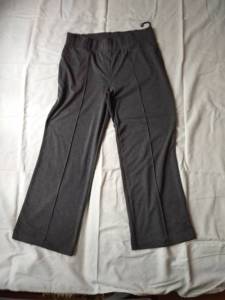
# Preprocessing the image
x = np.array(img)
# Turning this image into a batch of one image
X = np.array([x])

X = preprocess_input(X)
X

# Output:
# array([[[[-0.11372548, -0.15294117, -0.19999999],
#         [-0.11372548, -0.15294117, -0.19999999],
#         [-0.10588235, -0.14509803, -0.19215685],
#        ...,
# ...
#         [-0.60784316, -0.6392157 , -0.6627451 ],
#         ...,
#         [-0.5686275 , -0.79607844, -0.90588236],
#         [-0.5764706 , -0.8039216 , -0.9137255 ],
#         [-0.58431375, -0.8117647 , -0.92156863]]]], dtype=float32)

X.shape
# Output: (1, 299, 299, 3)
preds = model.predict(X)
preds

# Output: 1/1 [==============================] - 0s 310ms/step
# array([[-1.8251262, -5.563749 , -1.7097404, -1.1727802,  8.93474  ,
#        -2.1753707, -2.9585268,  2.3701181, -1.7067657, -4.3549995]],
#      dtype=float32)
classes = [
    'dress',
    'hat',
    'longsleeve',
    'outwear',
    'pants',
    'shirt',
    'shoes',
    'shorts',
    'skirt',
    't-shirt'
]

# Combining labels with actual prediction
dict(zip(classes, preds[0]))

# Output:
# {'dress': -1.8251262,
#  'hat': -5.563749,
#  'longsleeve': -1.7097404,
#  'outwear': -1.1727802,
#  'pants': 8.93474,
#  'shirt': -2.1753707,
#  'shoes': -2.9585268,
#  'shorts': 2.3701181,
#  'skirt': -1.7067657,
#  't-shirt': -4.3549995}
Converting Keras model to TensorFlow Lite model
Nothing new so far, now we want to use TensorFlow Lite to do the same. TensorFlow Lite already comes with TensorFlow. There is a Converter that we can use to make this Keras model available in TensorFlow Lite. For more information you look at Python quickstart guide.
What’s happening under the hood here is, first the Keras model is converted to an intermediate result and then from this saved model format to a TensorFlow Lite model.
converter = tf.lite.TFLiteConverter.from_keras_model(model)

tflite_model = converter.convert()

# Saving the model
with open('clothing-model.tflite', 'wb') as f_out:
    f_out.write(tflite_model)

!ls
# Output:
# clothing-model.h5     pants.jpg
# clothing-model.tflite test.py
Loading the model and getting the input and output indices
import tensorflow.lite as tflite

interpreter = tflite.Interpreter(model_path='clothing-model.tflite')
# Loading weights from the model to the memory
interpreter.allocate_tensors()

# Output: INFO: Created TensorFlow Lite XNNPACK delegate for CPU.
# Figuring out the input
interpreter.get_input_details()

# Keras way of doing this (automatically)...
# from keras.preprocessing.image import load_img
# from keras.applications.xception import preprocess_input

# model = keras.models.load_model('clothing-model.h5')

# Reading the image
# img = load_img('pants.jpg', target_size=(299,299))

# Preprocessing the image
# x = np.array(img)

# Turning this image into a batch of one image
# X = np.array([x])
# X = preprocess_input(X)

# preds = model.predict(X)
# preds

# Output:
# [{'name': 'serving_default_input_28:0',
#  'index': 0,
#  'shape': array([  1, 299, 299,   3], dtype=int32),
#  'shape_signature': array([ -1, 299, 299,   3], dtype=int32),
#  'dtype': numpy.float32,
#  'quantization': (0.0, 0),
#  'quantization_parameters': {'scales': array([], dtype=float32),
#   'zero_points': array([], dtype=int32),
#   'quantized_dimension': 0},
#  'sparsity_parameters': {}}]
This is the interesting part, because it tells us which part of the model is the input.
interpreter.get_input_details()[0]['index']
# Output: 0

input_index = interpreter.get_input_details()[0]['index']

# Needing also index of the output
interpreter.get_output_details()

# Output:
# [{'name': 'StatefulPartitionedCall:0',
#  'index': 229,
#  'shape': array([ 1, 10], dtype=int32),
#  'shape_signature': array([-1, 10], dtype=int32),
#  'dtype': numpy.float32,
#  'quantization': (0.0, 0),
#  'quantization_parameters': {'scales': array([], dtype=float32),
#   'zero_points': array([], dtype=int32),
#   'quantized_dimension': 0},
#  'sparsity_parameters': {}}]

interpreter.get_output_details()[0]['index']
# Output: 229

output_index = interpreter.get_output_details()[0]['index']
Inference Part
We have a neural network with many different elements and we can set one of this elements to something. Let’s set input tensor to X and invoke the computation in the neural network. Remember X is the already preprocessed input which is the pants image.
# Initializing the input of the interpreter with this X
interpreter.set_tensor(input_index, X)

# Invoking the computations in the neural network
interpreter.invoke()

# Results are in the output_index, so fetching the results...
preds = interpreter.get_tensor(output_index)
preds

# Output:
# array([[-1.8251266, -5.563747 , -1.7097405, -1.1727808,  8.934737 ,
#             -2.17537  , -2.958527 ,  2.3701177, -1.7067664, -4.3549995]],
#            dtype=float32)
classes = [
    'dress',
    'hat',
    'longsleeve',
    'outwear',
    'pants',
    'shirt',
    'shoes',
    'shorts',
    'skirt',
    't-shirt'
]

# Combining labels with actual prediction
dict(zip(classes, preds[0]))

# Output:
# {'dress': -1.8251266,
#  'hat': -5.563747,
#  'longsleeve': -1.7097405,
#  'outwear': -1.1727808,
#  'pants': 8.934737,
#  'shirt': -2.17537,
#  'shoes': -2.958527,
#  'shorts': 2.3701177,
#  'skirt': -1.7067664,
#  't-shirt': -4.3549995}
 knowMLedge.com